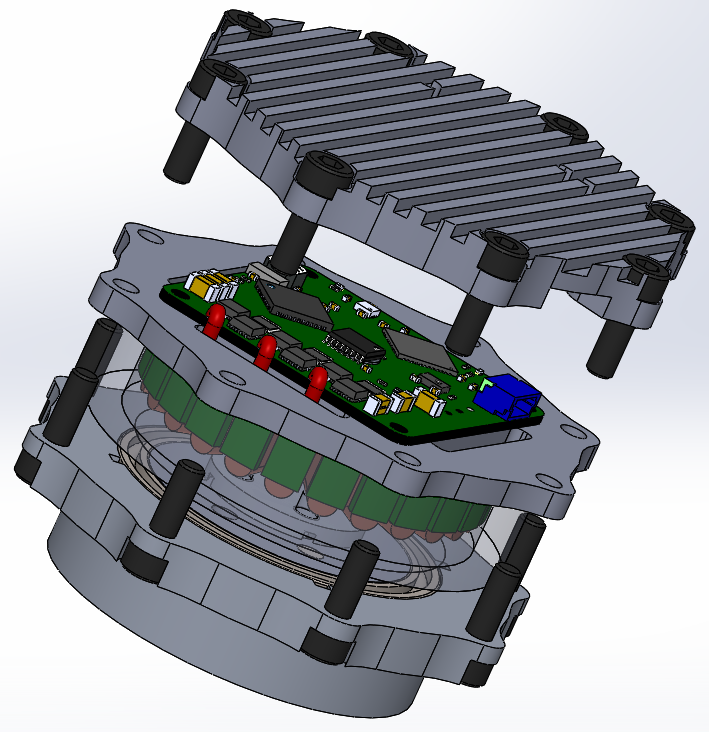
Recently, I haven't posted any updates as I was completely absorbed with my bachelor's thesis. Thankfully, it's almost finished and I'll have some more time for the actuators and quadruped robot soon. This post is going to be short, but I want to post the static torque data that I said I would, but most probably I forgot. So here it is:
The test bench consists of a single motor, dynamic torque transducer (it was purchased by our sumo robot club to measure both static and dynamic torques), and a lever to fix the other end of the transducer's shaft to the test bench. Obviously for now the sensor works only in the static scenario. The motor was commanded with incrementally increasing q currents and the measured torque was plotted. I tried to cool the motor down to room temperature before each run in order to minimize the influence of increased temperature.
It was able to produce 3Nm of peak torque at about 35A of q-axis current (near 10A on the power supply). The torque constant was determined to be roughly 0.125Nm/A in the linear range. After commanding currents above 25A the motor starts to saturate, so the torque performance is reduced and the motor is heating very quickly. Overall I'm happy with the results, 3Nm of maximum torque should be sufficient to perform basic types of gaits. Especially if I make the quadruped structure lightweight.
Today I'd like to post some thermal data that I've gathered recently. I wanted to check what is the maximum continuous torque of my motor module. By continuous I mean the amount of torque the motor is able to produce infinitely without overheating. It seems that many actuator manufacturers interpret "continuous torque" differently - sometimes by continuous they mean a short period of time, which is far from being continuous (Josh made a similar observation in his log: https://jpieper.com/2020/08/07/up-rating-the-qdd100-beta-thermal-bounds/). I decided to test my actuators and determine what is their continuous torque rating. The test stand was rather simple - an actuator with a lever pushing against a table.
I was simply commanding different torque values and waiting for the actuator to heat up. This was quite a monotonous process as the estimated time constant was about 16 minutes and I stopped each experiment after a duration of five time constants (almost 1,5h).
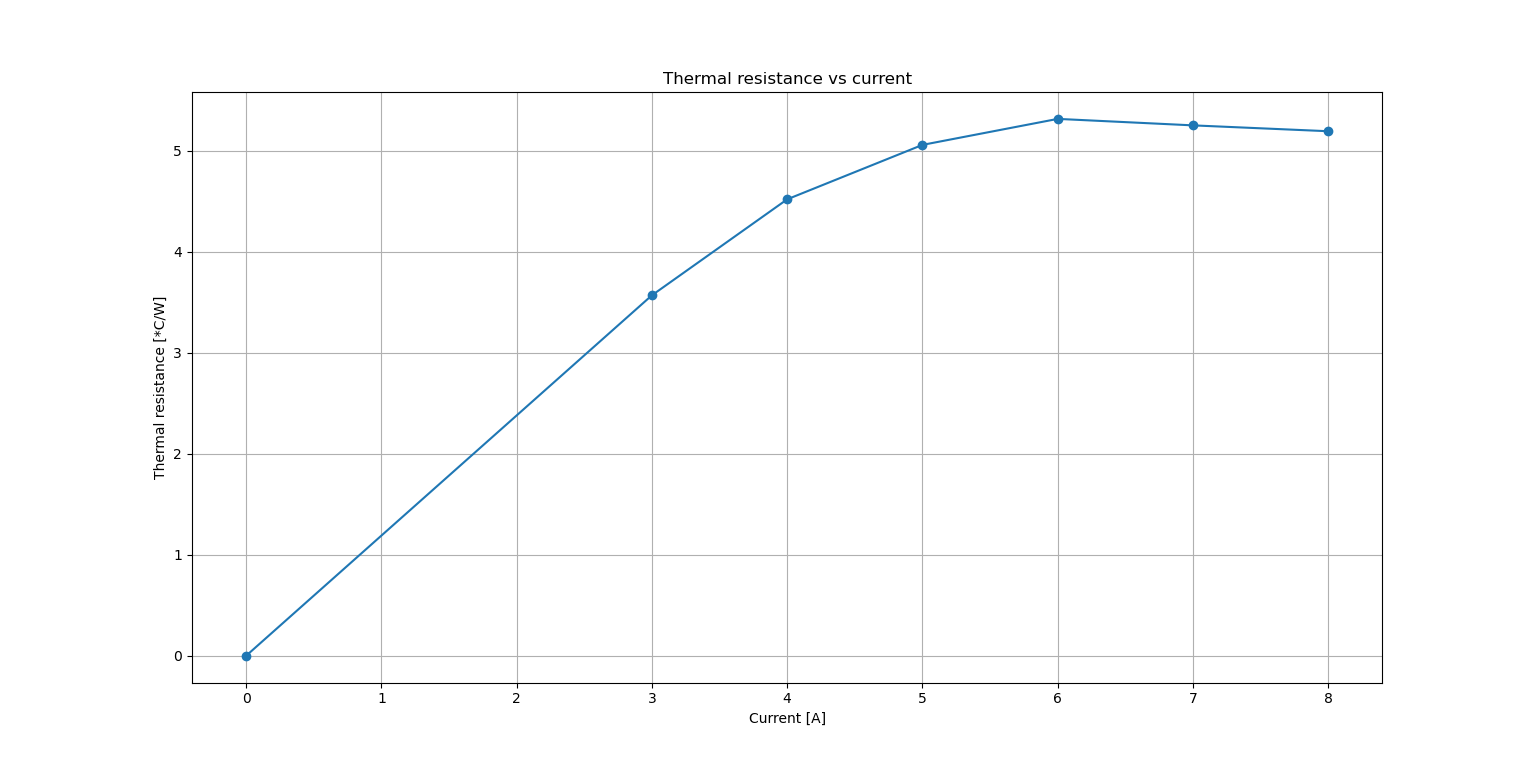
I wanted to go one step further and prepare a simple first order system model. After all the thermal circuit can be modelled similarly to a simple parallel RC circuit, where the resistance is the thermal resistance form the module to air, capacitance is the thermal capacitance, voltage is temperature and current is power loss. The input to the system is power loss that occurs on the winding resistance. The model is able to fit a single curve, however due to changing thermal resistance to ambient it is no good in predicting a few different responses. This is the outcome:
The ambient temperature was about 25*C, and the actuator initial temperature was 30*C.
As you can see the thermal resistance varies with different currents being applied. This is why it is so hard to predict the resultant temperature response based solely on the current. Nevertheless the real characteristics helped me to determine the maximum continuous torque which is 0.875Nm (7A), and with that current the device should never reach 65*C.
In the next entry i'm going to publish some static torque data.
this is going to be just a short log about new way of fixing the sun gear to the aluminium shaft mounted to the rotor. During some high speed tests of the actuator I noticed that the sun gear slipped on the aluminium axis when I tried to stop the output 3d-printed lever. I was kind of expecting it as I haven't made a strong interference fit and used just a regular epoxy adhesive and paid no extra attention to that part. I decided to try some new methods.
The first idea was to make a hole in the aluminium stock before milling, and then mill the motor shaft part so that the shaft has this long groove. A similar groove was milled in the sun gear as well. As you might expect it was supposed to be a keyway connection. The key was simply a piece of mild steel screw shaped to fit the empty space.
before pressing in the key
After pressing the key
The connection looked ok, but was a bit springy when I tried to break it using pliers. I succeeded eventually and saw the shaft was weakened by the groove.
broken connection
The second idea was to make something like a shape connection (I do not know the professional name) where the shaft and gear are milled with a matching shape and then just pressed onto each other. This connection does not require additional elements, however it is inevitable to avoid the rounded edges when milling the shaft "tab". The rounded corners favor breaking the gear by pushing on its walls outwards.
"shape fit"
This kind of connection weakened the gear and when I tried to break it I just broke the gear. It could be influenced by the additional force exerted by the pliers as well, but I did not want to take that chance.
The last idea was to make two small tabs on the shaft (making it more rigid as well) and two grooves of the same shape in the gear. However the tabs were substantial smaller, and they reached only half of gear's length. The rest was just a normal shaft, though slightly larger in order to make a strong connection when the gear is press fitted onto it.
Two small tabs milled with 6mm endmill
Two small grooves made with 1,5mm endmill
The two parts were cleaned with alcohol and epoxy adhesive was applied on the contact surfaces. I used a vise and slowly pressed the gear onto the shaft. I haven't really tried to break this part manually, however I mounted it in the motor module and till now it survived a few hard shocks and about 0.45Nm of continuous torque (on the motor shaft).
If it fails I'll try adding loctite adhesive, but hopefully this connection will be strong enough ;)
It's been a while since I last wrote, but it was mostly because I was engaged in writing my thesis and programming the actuator as well as writing a simple service app. Right now I'm testing the actuator and preparing a torque test stand in order to determine maximum torque and see if there is no severe cogging torque.
I've made a few changes in the actuator design since the first prototype was made. A couple of parts (including the rotor) were milled with additional slots in order to make them lighter.
these four slots result in 6g of mass reduction
the rotor mounted in the case
I also modified the stator mount part in order to place the rotor a bit lower than it was before. I gave up on three of four slots (initially made for motor cables) as I think they negatively influenced the heatsinking ability of the part.
The gearbox housing was milled with eight additional slots and eight mounting threaded holes. Initially I wanted to use half of the motor gearbox screws for holding the motor to the external housing, but I decided to make additional threaded holes just for fixing the actuator. This solution looks much better and I do not have to use only four out of eight screws.
Gearbox housing botom view
Moreover I milled the part that is used for connecting two actuators front-to-back. This was the most complicated part as there were many milling operations and the part required flipping. I even made a short time-lapse video about it :
The part itself:
In order to reduce the backlash I modified the planet carrier pins to 3.1mm instead of 3mm (the gearbox planets holes are about 3.11 - 3.12mm in diameter which is not very convenient). There is still some play at the output, but at this point I cannot do anything about it, other than replacing the gearing system. For now it is okay.
I prepared an early 3d-printed prototype of robot's leg:
Leg prototype
The thigh is mounted to the knee actuator, whereas the knee actuator is mounted to the thigh actuator. This way the joints are independent which simplifies the mathematical analysis. The knee joint is driven by a belt. All three actuators were mounted as close to the torso as possible in order to make the leg light and reduce the moment of inertia. The adduction / abduction motor (hip actuator) is going to be placed in the robot's torso and connected to the thigh actuator.
Besides mechanical parts modifications I made a simple python app for communicating with each actuator. The main purpose of the app is to be able to update the drivers' firmware by FD-CAN bus. Although there are some other functionalities such as spring/damper position control, offset measurement, motor parameters identification (d/q axis inductances and phase resistance used for PI controller gain calculations), setting the bounds within the motor should stay during the movement, or the live plot of measured quantities. So far it's been really useful in testing the motor and testing different ideas during development.
Service app - i know it looks awful ;)
In the end some high speed actuator tests that I performed recently:
Hope you enjoyed this entry! Next time I'll do a quick writeup about the torque test bench and post some results ;)
You can follow me on Instagram for more frequent updates: https://www.instagram.com/klonyyy/
Recently I've written about the motor controllers, and now it's time for mechanical aspects of my project - the aluminum case holding the parts together. It took me about a week to finish a 3d model of the module. Then I 3d printed the parts, made some adjustments, and started milling the individual parts. The material used is PA6 aluminum (2017 T4511) bought in 70mm slices of different height. It is relatively cheap and easy accessible in my town (less than 8$ per kilo and ablut 1,5$ for band-saw cutting the slices). Milling in this material is very pleasant and at the same time mechanical properties of this aluminum alloy are sufficient for my purposes. While machining I did not have to use a lot of coolant (which is quite important as still use a plywood table). I mostly used IPA alcohol and WD-40 to cool down the part in moments where a lot of material was being removed.
Now it is the photos time:
sun gear and bearing pressed onto the pin
I know the surface of the motor is sloppy it was done by hand, will fix it next time ;p
This part is the rotor extension so that I can press-fit a gear on it. The diameter step on the tip of the part is for bearing. It was milled from a 20mm PA6 aluminum cylinder.
Each 70mm cylinder slice was faced in order to get a flat reference point. Actually the one on the picture was earlier faced in the vice from other side, and this photo was made after facing from top side.
I mostly used screws to fix the material to the table, as it was the fastest way considering I do not own any good claps yet.
This is the lower part with PCB cap and stator press-fitted onto the cylinder. Now it is time for the distancing cylinder:
This was the part that required the most coolant as it is relatively thin and a lot of material has to be removed around it. I did not noticed any problems caused by overheating whatsoever.
Probing the gearbox mount
slots made for internal gear's tabs
though the endmill was a bit to big it looks nice and fits tightly!
lower planet carrier with additional sleeve for bearing ring
gearbox mount, top planet carrier, lower planet carrier ready to be assembled
And after milling the parts it was the time for assembling them:
I'm really happy with the result, considering it was machined on a low cost DIY CNC machine. Of course it works - for now only in spring/damper mode (and open loop d/q voltages mode), but I'm working on a FDCAN communication app and more features right now. Hope you enjoyed it, and see you next time.
I recently got the PCB's of my new brushless motor controller. It is also my first 4-layer design, so I was quite excited about it. I also ordered a stencil, so that the soldering is faster and more reliable. When the PCB's finally came to me I was very happy with the result. Although after a closer look I noticed some via problems. I do not know what is the origin of this problem, but these vias seem to be really bad quality.
At the same time the soldermask is very thin and literally scrapes off when being touched by hot soldering iron. I guess this it what you get for 13$ (JLCPCB) :) Although for prototyping purposes this offer is a great deal as 13$ is super low price for a 4-layer design and I still haven't seen a similar offer anywhere else.
I found an issue with the MOSFETs after soldering them to the pads. One of these two pieces of drain connector sticking on both sides was shorting motor terminal to V+. I had to move each low side FET a bit further from the pad to get rid of this issue. It turned out that my FET library wasn't precise enough (missed these two insets), but fortunately it is an easy bug to fix in the next iteration.
This time it will be a short entry about the milling machine and Z axis changes. Two weeks ago I received my 300mm long 20mm linear rails. I ordered them in the first place because the supported shafts had too much play, and thus the dimensions in y axis were a few hundreds off. New design is a lot stiffer and has roughly 140mm movement range comparing to 110mm achieved on supported shafts. The most important thing is that they have no play that can be seen with the naked eye. I will share the results, when I do the measurements using dial indicator. Again the parts were milled from a plywood plate on a bigger CNC machine in order to detect any possible issues without spending a lot of money on the materials. Some photos as always:
Z axis before modification
Linear rails in place as well as the ball screw
Finished!
Another thing I guess is worth sharing, is the chip protection for the lower linear rails and ball screw (y axis). I wanted to make curtains following the table - something similar to window blinds. I had to prepare a mechanism for folding and unfolding the curtains when the table moves. The simplest idea I came across was to use torsion springs from cheap folding rules. I 3d-printed my own casings, inserted the springs, added a bearing on each side and used a pvc tube as the shaft. The curtain is mounted to the table using slats with a few screw holes. The whole thing is quite nice-looking and most importantly keeps the chips away from the rails and ball screw.
Mounting process
Inserting the spring
A video of the solution:
The last thing is just an interesting video of drilling using a blunt drill. When you look closely there is a visible heat wave coming off the hole when the drill pushes down on the part :)